Showing posts with label Google. Show all posts

Move Your Photos And Album From One Picasa Account To Another

As you know Picasa is now a part of Google and its uses your same gmail account. If you want to move your photos and album from one of your Picasa account to another Picasa account it is very simple follow these steps which will guide you to transfer your photos and albums with some clicks.

Transfer photos to a new account

Before you migrate your Picasa Web Albums account, note that this tool transfers your existing photos, videos, comments, likes, and followers to a different account. Once the transfer has completed, it can't be undone.
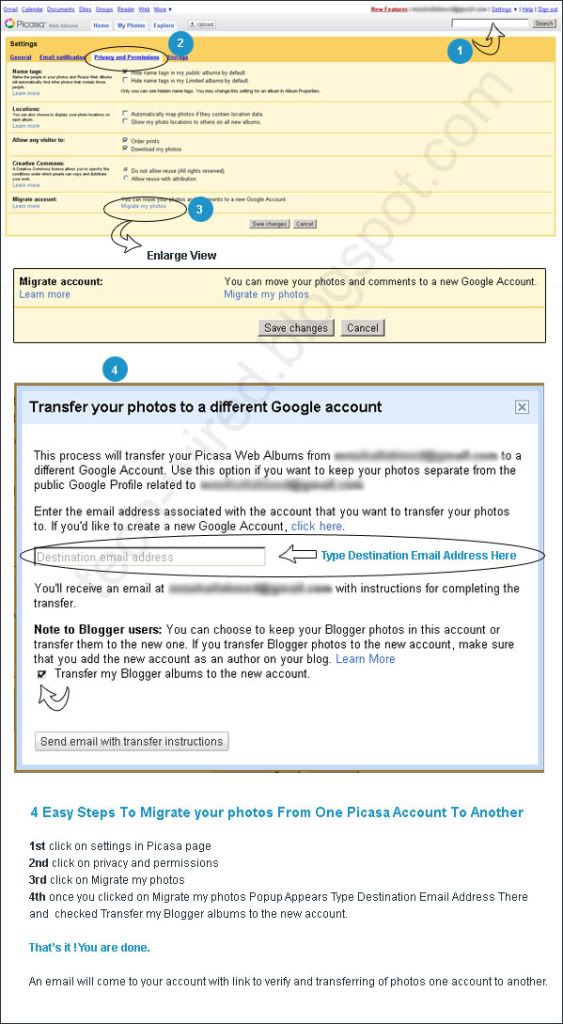
  1. In Picasa Web Albums, click the gear icon and choose Photos settings.
  2. On the Privacy and Permissions tab, click Migrate my photos in the 'Migrate account' section.
  3. In the resulting dialog, enter the email address to which you'd like to transfer your photos. If this address isn't already a Google Account, we'll ask you to create one.

    Note:
     You can't use your former Picasa Web Albums username as your new Google Account username. Also, the tool won't overwrite your photos even if your target account has existing photos and videos.

  4. Click Send email with transfer instructions.
  5. Check your email at your original address.
  6. Click the link in the email and follow the steps to complete the transfer.
The transfer happens on our servers so there's no download then re-upload required by you, but depending on how many photos and videos you have, this transfer may take up to 24 hours to complete. We'll send you an email when the transfer is finished.

Important notes
  • Existing links: Any existing links or embedded images from the old account will continue to work - they'll be redirected to the new location - after the move is complete.
  • Google storage: If you've purchased Google storage for your old account, that storage remains with your old account. However, you'll also have the same amount of storage - for photos only - available in the new account.
  • Blogger users: You can choose to keep your Blogger photos in this account or transfer them to the new one. If you transfer Blogger photos to the new account, be sure to add the new account as an author on your blog.
  • Sync to Web: Albums that were previously 'synced' between Picasa and Picasa Web Albums will not automatically be synced in your new account. You will need to manually re-enable sync for the desired albums. Picasa will recognize previously synced albums and not create duplicates.
resource

In below image i have made also 4 Easy Steps To Migrate your photos From One Picasa Account To Another. I hope this will give you better idea how to that.
4 Easy Steps To Migrate your photos From One Picasa Account To Another

How To Edit Or Delete Your YouTube Channel Name

There is no way you can edit your channel name from “ABC” to “XYZ” in YouTube there is only a way by which you can change yours channel name and that is “Close YouTube Account “.

 Where to find "Close Account" button:

• Sign in with your gmail account and open YouTube .

• Click top right side of dropdownand click "Settings".

• Now "Account Setting" page will open click "Manage Account" in left side menu.

• On "Manage Account" page find "Close Account" button and press it. It will propmt and asks your final confirmation.

• Once finish confirmation press "Save Changes" at bottom of the page.

 That's it your account is closed.

Once you close your YouTube account now you can make new channel with new name this process is good for those who mistype or did any typing mistake or may be want to change their channel name on YouTube and they dint upload much stuff on it.

One drawback of closing YouTube account is that you lost all videos you upload and subscriber in that channel.

So be careful, once you understand the whole process then start doing it otherwise keeps going with your current channel name.

Gmail A new sign-in page coming soon...

As noticed from last three months Google are making changes in there designing to make it more user friendly with their light theme and different ui related feature which once again makes Gmail is better than other mailing other email service like Hotmail, Yahoo and others.

Gmail new in page coming soon you can view it live when you type www.gmail.com at bottom you will find a tip box where written "Coming soon: A new sign-in page!" very next to it there is preview link where you can check the upcoming gmail login page.

Below you will find current login page and Upcoming gmail login page.

Upcoming Gmail Login Page:


Current Gmail Login Page:


Effective way to make secure password and easy to remember

Online Password Security
It is difficult for us to remember all our passwords to all of the sites if we have multiple passwords for multi purposes like Emails, Hosting Accounts, Banks and many more. Choosing a secure password is a matter of creating unlikely letter and number combination's. The more obscure your password, the tougher it will be to crack.

Here's is some effective way to remember your password in which your password is complex but you can easily remember it.

Effective way to remember your password:

Below you will read some techniques about making strong and complex password with easy to remember.

An effective way to do this is to choose the first letters of a sentence that you will remember.
e.g. "I have 2 mobiles from brand "HTC" and "NOKIA".

Now use first letters of above sentence to make you password difficult and easy to remember.

"Ih2mfbHaN"

As mentioned earlier that password length should be at least 14 characters long so you can add your mobile number last digits or some punctuation e.g. (lh2mfbHaN:2979).

Now if you want to check the strength of your password so you can check any online password checker website. e.g. (http://www.passwordmeter.com/)
Another way from same sentence is to just remove spaces between sentence.

"I have 2 mobiles from brand "HTC" and "NOKIA".
For Password
"Ihave2mobilesfrombrand"HTC"and"NOKIA".


Tips:

You can make number of combination with small and big sentences or with date of birth, collection of brands you wear, your favorite personalities and so on.

An ideal password is long and has letters, punctuation, symbols, and numbers.
  • Whenever possible, use 14 characters or more.
  • The greater the variety of characters in your password, the better.
  • Use the entire keyboard, not just the letters and characters you use or see most often.
Avoid creating passwords that use:
  • Dictionary words in any language.
  • Words spelled backwards, common misspellings, and abbreviations.
  • Sequences or repeated characters. Examples: 12345678, 222222, abcdefg, or adjacent letters on your keyboard (zxcvbnm).

Google to make sites 60% percent faster with PSS

Google

Google to make sites 60% percent faster

Google has said that it wants to make the web faster for all surfers for this Google is offering free trial service for website owners named Page Speed Service (PSS). To get the best possible outcome from Google servers you need to ensure that all code is written according to practice guidelines and that all images are compressed professionally. It will then use Google server to deliver the sites more quickly.

Page loading times affect a website's ranking in its search index, so sites using PSS will be among the first displayed in search results.PSS doesn't work for the website that contains Flash based content and any type of audio or video streaming.

Google is not charging for this service now but later pricing will be available.

What is Page Speed Service?
Page Speed Service is an online service to automatically speed up loading of your web pages. Page Speed Service fetches content from your servers, rewrites your pages by applying web performance best practices and serves them to end users via Google's servers across the globe.

http://code.google.com/speed/pss


Twitter Delicious Facebook Digg Stumbleupon Favorites More